
OneATS vs Tribepad
Last updated · Maintained by the OneATS product team
- Tribepad is a Sheffield-based ATS used by UK employers, including the public sector, health and social care, and retail.
- Tribepad’s SME plan starts from £579/month paid annually, plus a £2,000 set-up cost. OneATS has a free plan and paid plans from $12 per user/month billed annually.
- Tribepad hosts new customer platforms in the UK. OneATS hosts data in India (AWS Mumbai), with transfers covered by our DPA.
Side by side
Competitor details checked on 17 November 2026 from their public pages. Prices and plans change — check the source for the latest.Reviewed by the OneATS product team
Sources: Tribepad pricing Tribepad applicant tracking system Tribepad onboarding Tribepad video screening Tribepad security and compliance Tribepad contact (Sheffield office) . OneATS prices exclude GST.
Inside OneATS
What you'd use instead of Tribepad
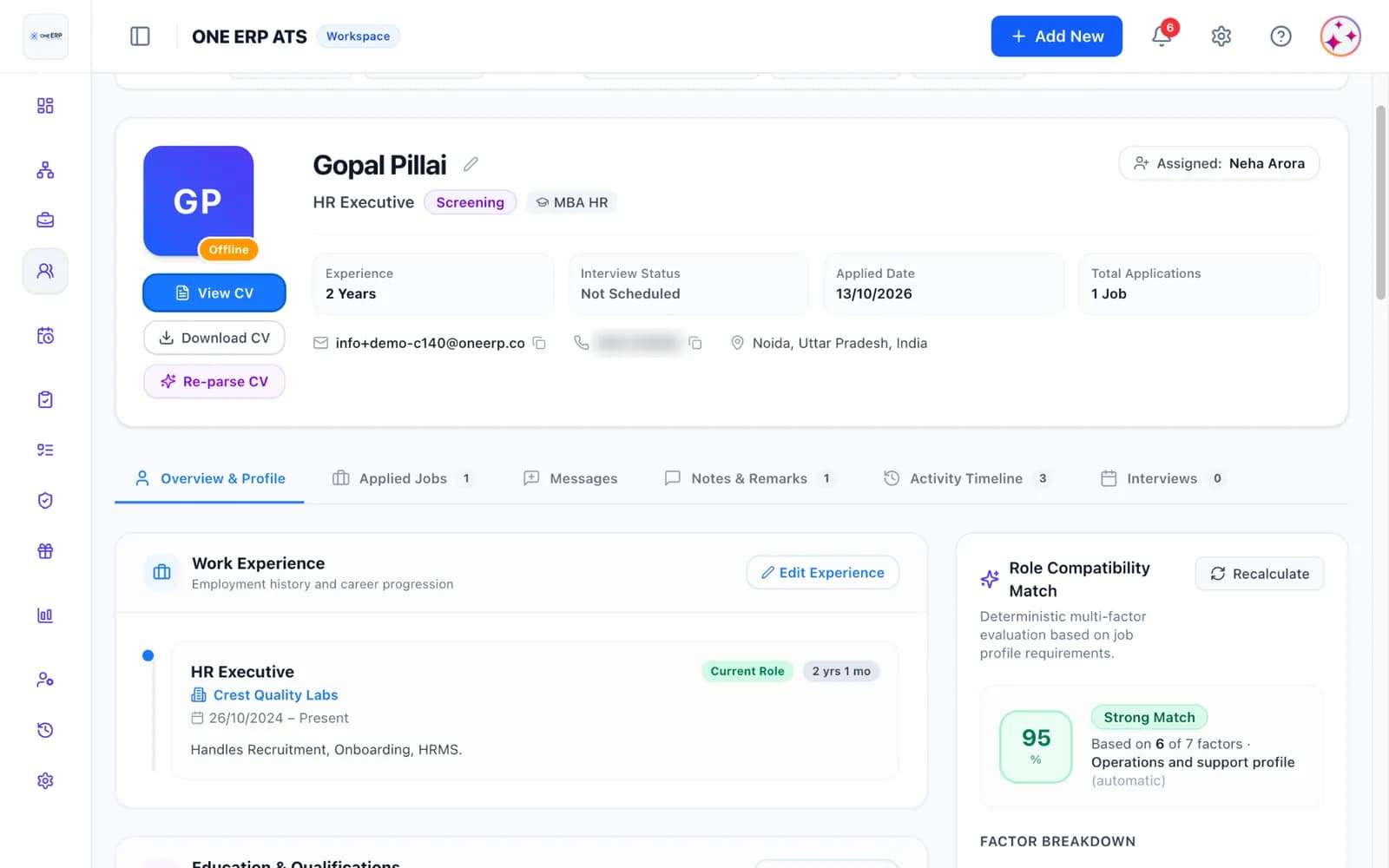
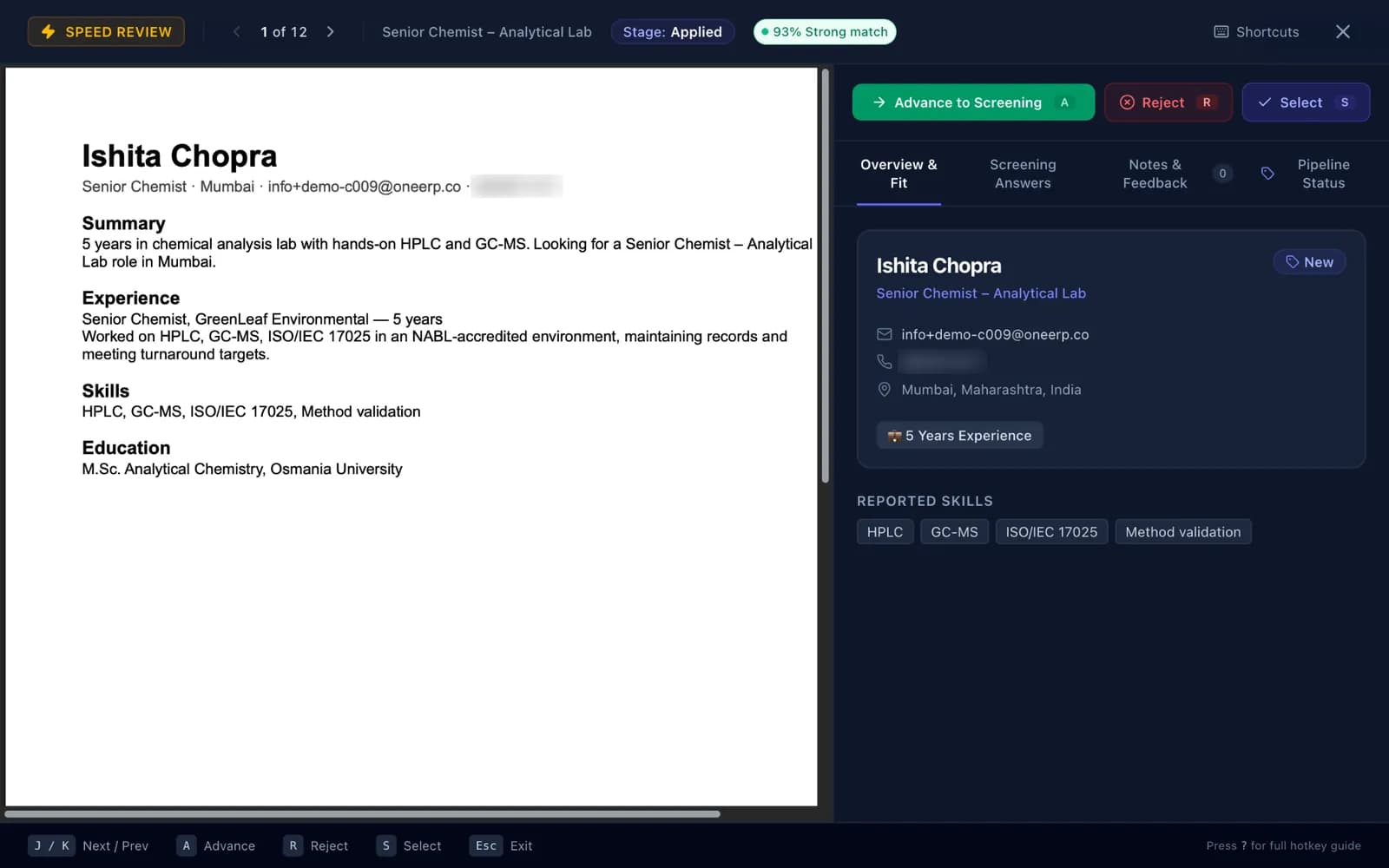
If you move from Tribepad, these are the two screens your recruiters will spend most of their day in: the candidate profile with CV preview and match score, and Speed Review for screening one applicant at a time.
Target Audience
Who each tool is built for
Choosing between OneATS and Tribepad depends on your recruitment volume, internal team structure, and whether your primary hiring occurs in India or international markets.
Built for speed, simplicity, and Indian hiring
UK startups, SMEs and agencies that want to start without a set-up fee or sales call, with Microsoft 365 scheduling, structured scorecards, candidate privacy controls built around UK GDPR, and onboarding in one place.
Choose OneATS if you are a growing team that wants to start on a free plan or a 14-day trial, pay per recruiter with free interviewer seats, and avoid an up-front set-up fee.
When to choose Tribepad
UK organisations with complex or high-volume hiring — including public sector bodies, health and social care, retail and hospitality — that need UK data hosting, integrated right-to-work checks and a fixed quote for a configured platform.
Choose Tribepad if your data must be hosted in the UK, you need right-to-work checks through TrustID inside the ATS, or you run volume hiring across multiple brands with 750+ employees.
Why UK SMEs choose OneATS over Tribepad
Tribepad was architected with different organizational priorities in mind. In contrast, OneATS is engineered specifically for fast-paced hiring workflows in India:
- A free plan and a 14-day trial: no set-up fee or sales call to get started.
- Pay per recruiter, with hiring managers and interviewers free on paid plans.
- Consent on apply, data access and erasure requests with due dates, and retention you set, designed around UK GDPR principles.
- An explainable 0–100% match score that shows why each applicant ranks where they do.
When Tribepad is the better fit
We believe in objective evaluations. Here are practical operational scenarios where selecting Tribepad makes business sense:
- Your candidate data must be hosted in the UK.
- You need right-to-work checks run inside the ATS (Tribepad Checks with TrustID).
- You hire at volume in the public sector, health and social care, retail or hospitality, where Tribepad has sector experience.
- You have 750+ employees, several brands and want a configured platform on a fixed quote.
Migration Walkthrough
How to switch from Tribepad to OneATS
Moving from Tribepad means exporting your candidates, importing them with the OneATS Excel template, and uploading the CVs you need. You can run both systems side by side until your open roles close.
- 1
1. Export candidate records from Tribepad
Export your candidate records as a spreadsheet and download the CVs you want to keep. Ask your Tribepad contact if you don’t have an export option.
- 2
2. Import spreadsheet and upload CVs into OneATS
Download the OneATS candidate import template (Excel), copy your exported columns into it, save it as .xlsx and import it. Then upload candidate CVs in batches of up to 20 per job opening.
- 3
3. Connect Microsoft 365
Connect your Microsoft 365 organisation so Outlook calendars sync both ways and interviews get Teams links automatically.
- 4
4. Invite your hiring managers with free seats
Invite hiring managers and interview panelists to review CVs and submit scorecards, without paying for their seats.
What does not move during migration
When moving candidate archives from Tribepad to OneATS, certain platform-specific configurations remain inside Tribepad:
- Video screening recordings (download the ones you need to keep)
- Right-to-work check results from Tribepad Checks (keep your records as your process requires)
- Configured workflows and talent pool rules (set your stages up again in OneATS)
What you get with OneATS
- Post to Naukri, LinkedIn, Indeed, Google for Jobs and WhatsApp from one dialog
- Google and Microsoft calendar sync with candidate self-scheduling
- Real Meet, Teams and Zoom links created automatically
- Source, funnel and time-to-hire analytics built on real events
- Onboarding from offer to first day, in the same system
- Prices in ₹ with GST invoices, and a free plan
Testing OneATS alongside Tribepad?
Evaluate OneATS alongside Tribepad with our free plan. Get 2 active jobs, 50 applicants per month, branded careers pages, and Google for Jobs indexing. No credit card required. Experience candidate self-scheduling and assisted Naukri distribution firsthand.
Start hiring better today
Free plan available. No credit card required. Set up in minutes.