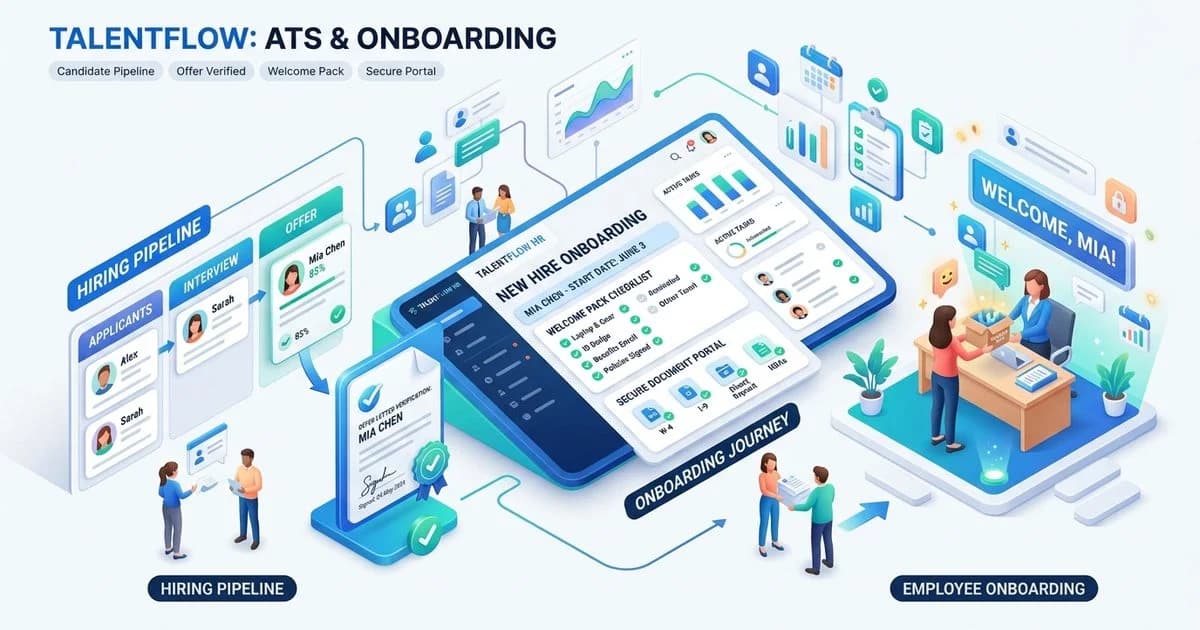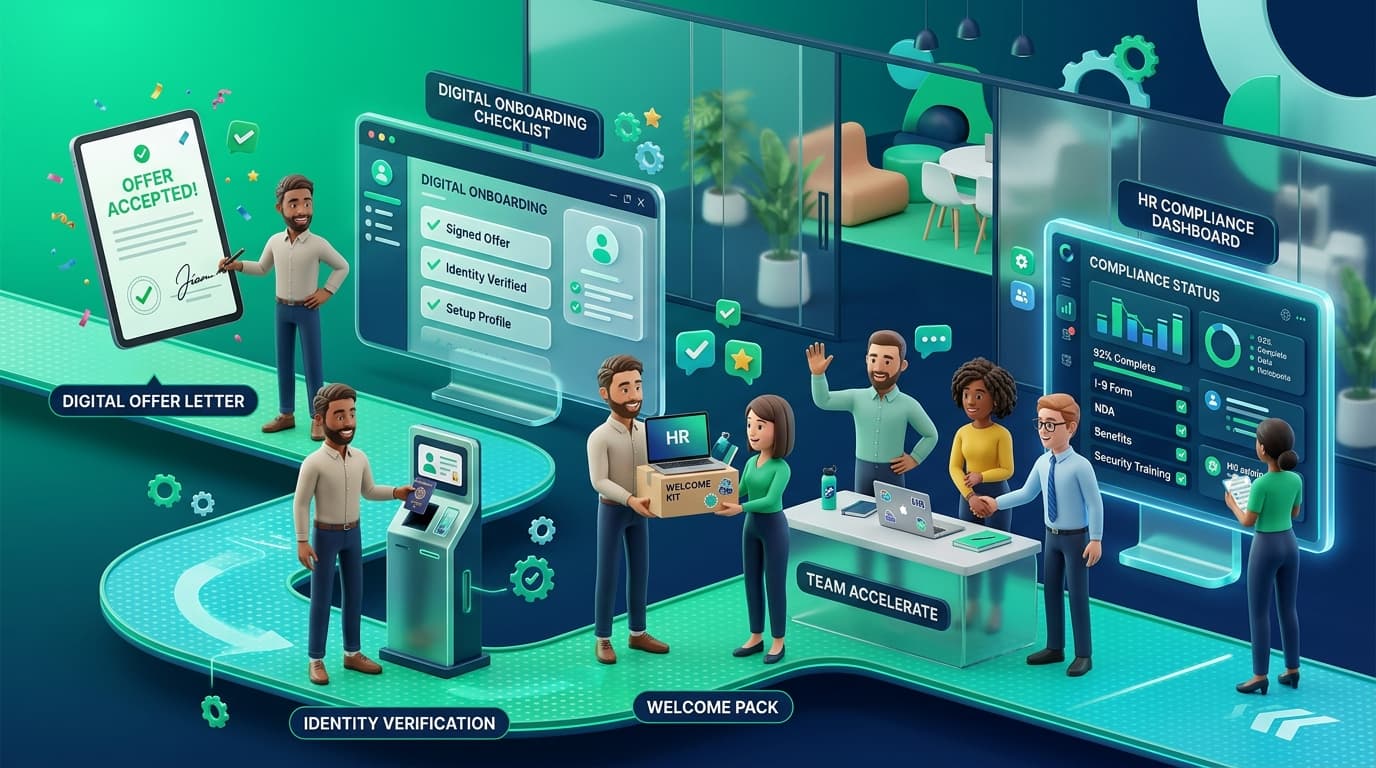
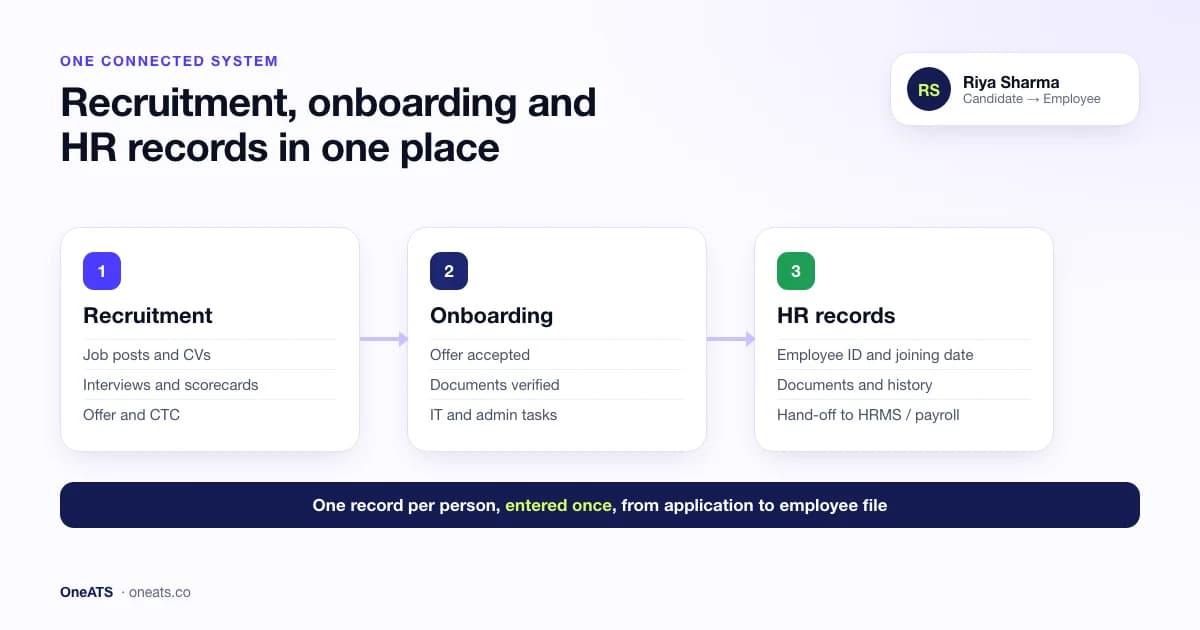
Are there systems that unify recruitment, onboarding, and HR records? Yes. Several kinds of software now bring recruitment, onboarding and HR records into one place, so a candidate's details are entered once and follow them from application to employee file. The three main types are all-in-one HR suites (HRMS or HCM platforms with a recruiting module), applicant tracking systems with built-in onboarding that hand a complete record to HR, and separate best-in-class tools connected by integrations. Which one fits depends on your hiring volume, your existing HR software and how much each stage matters to you.
Most growing companies still run three disconnected systems: job posts and CVs in one tool, offer letters and joining documents in email or WhatsApp, and employee records in a spreadsheet or HRMS. Every hand-off means retyping data, chasing documents and losing history. This guide explains how unified systems solve that, compares the three types, gives you a checklist to choose the right one, and answers a question HR teams ask us often: which onboarding tools integrate with an ATS so candidate data carries over automatically once a contract is signed?
- A unified system keeps one record per person, from first application to employee file.
- There are three types: all-in-one HR suites, ATS with built-in onboarding, and connected best-of-breed tools.
- All-in-one suites are broad but often have lighter recruiting tools; dedicated ATS platforms are deeper on hiring and onboarding.
- The hand-off from offer to employee record is where most data errors and new-hire drop-off happen. Judge any system on how it handles that step.
- Check compliance support for your country: DPDP Act 2023 in India, UK GDPR and right-to-work checks in the UK.
What does it mean to unify recruitment, onboarding and HR records?
Unifying recruitment, onboarding and HR records means one connected system manages the whole employee lifecycle, from job posting to the employee's file, without re-entering data at each stage. In practice, the candidate profile created when someone applies becomes their onboarding record when they accept an offer, and then their employee record when they join.
The three stages hold different information, which is why they are so often split across tools:
| Stage | What it manages | Typical data |
|---|---|---|
| Recruitment | Attracting and selecting candidates | Job posts, CVs, interview feedback, scorecards, offers |
| Onboarding | Turning an accepted offer into a ready employee | Offer and appointment letters, ID and tax documents, background and right-to-work checks, IT and admin tasks |
| HR records (core HR) | Managing the employee after day one | Employee profile, job and pay history, documents, reporting line, leave, exits |
A unified system links these so that, for example, the CTC agreed in the offer, the PAN or National Insurance number collected during onboarding, and the hiring manager's interview notes all sit on the same person's record.
Why separate hiring and HR tools cause problems
When recruitment, onboarding and HR records live in different places, the same problems show up in almost every team:
- Duplicate data entry: HR retypes the new hire's name, contact details, role and salary from the ATS into the HRMS, with typos and mismatches along the way.
- Lost documents: offer letters, ID proofs and certificates arrive by email or WhatsApp and are saved in personal inboxes, which is hard to audit and risky under data-protection law.
- New-hire drop-off: between offer and joining (often 30–90 days with notice periods) nobody owns communication, and candidates accept counter-offers. Our guide to ATS onboarding covers that stretch in detail.
- No end-to-end reporting: you cannot connect source of hire to 90-day retention or performance, because the data sits in different tools.
- Slow day one: IT and admin learn about the joiner late, so the laptop, email and access are not ready.
3 types of systems that unify recruitment, onboarding and HR records
There is no single "right" architecture. Each of the three approaches below can give you one connected record; they differ in where they are strongest.
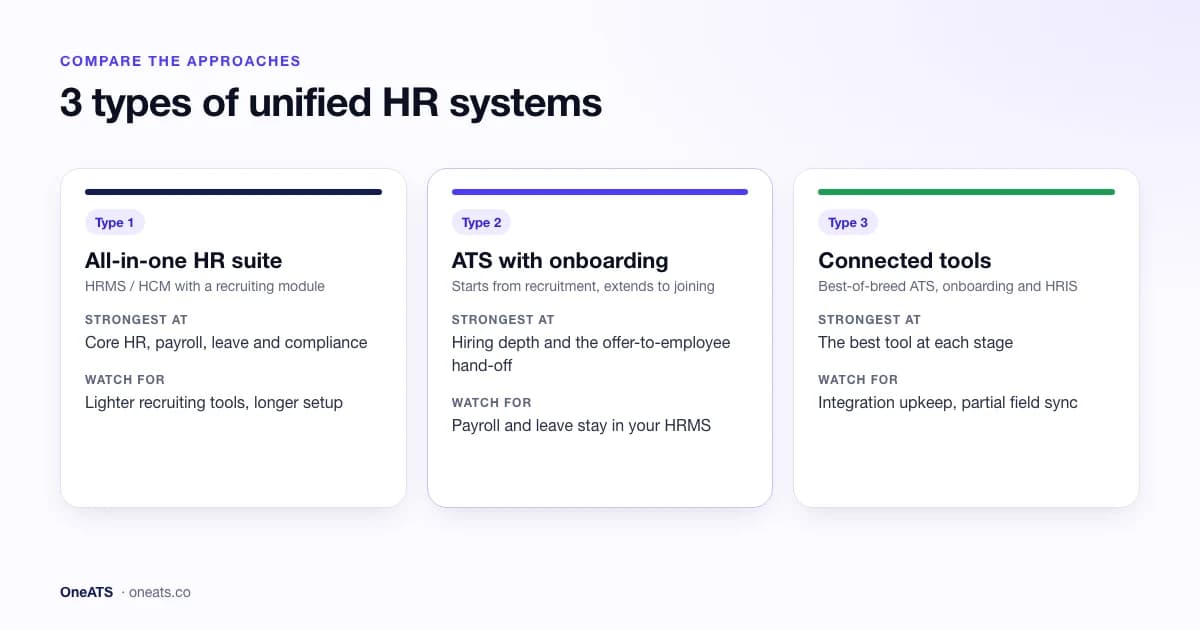
1. All-in-one HR suites (HRMS / HCM with a recruiting module)
All-in-one HR software starts from core HR (employee records, payroll, attendance, leave, performance) and adds recruitment and onboarding modules. Examples include Darwinbox, Keka and SAP SuccessFactors, and global platforms such as Workday and BambooHR.
- Strengths: one vendor and one login for the whole lifecycle; payroll and HR records are built in; strong for compliance-heavy, established HR teams.
- Trade-offs: the recruiting module is often lighter than a dedicated applicant tracking system, with fewer job-board integrations, simpler pipelines and less agency or high-volume support. Suites also tend to cost more and take longer to implement.
- Best for: mid-size and large companies that already need payroll and full HR, and hire at a steady, moderate pace.
2. Applicant tracking systems with built-in onboarding
Here the platform starts from recruitment and extends forward: job posting, CV parsing, pipelines, interviews and offers, then onboarding (offer letters, document collection, pre-boarding tasks), ending with a clean hand-off into an employee record. OneATS and Workable are examples of this approach. If you are new to the category, start with what an applicant tracking system does.
- Strengths: the deepest hiring tools (multi-board posting, resume parsing, scorecards, analytics); onboarding uses the same candidate record, so nothing is retyped; quicker to set up.
- Trade-offs: payroll, leave and performance usually sit in a separate HRMS. You need either an integration or a clean export for those.
- Best for: startups and growing teams that hire every month, recruitment-heavy companies, and teams whose HRMS is fine for payroll but weak at hiring.
3. Best-of-breed tools connected by integrations
Some companies pick the strongest tool for each stage (an ATS, an onboarding tool and an HRIS) and connect them through native integrations, an API or an automation platform.
- Strengths: the best features at each stage; you can replace one tool without changing everything.
- Trade-offs: integrations break or sync only some fields; three contracts and three logins; history can still be split between systems.
- Best for: larger organisations with an IT or HR-ops team to maintain the connections.
Comparison: which type of unified HR system is right for you?
| All-in-one HR suite | ATS with built-in onboarding | Connected best-of-breed | |
|---|---|---|---|
| Starts from | Core HR and payroll | Recruitment | Each stage separately |
| Recruitment depth | Basic to moderate | Deep (job boards, parsing, scorecards, analytics) | Deep |
| Onboarding | Usually included | Included, on the same candidate record | Separate tool or HRIS module |
| HR records, payroll, leave | Built in | Employee record at hand-off; payroll and leave via HRMS integration or export | Built into the HRIS |
| One record from application to employee | Yes | Yes, up to and including the employee hand-off | Only if integrations sync every field |
| Setup time | Weeks to months | Days | Weeks, plus ongoing upkeep |
| Typical buyer | Established HR teams at mid-size and large companies | Startups, SMBs, growing and recruitment-heavy teams | Enterprises with HR-ops support |
How a unified system works: from application to employee record
In a unified system, one record moves through five stages:
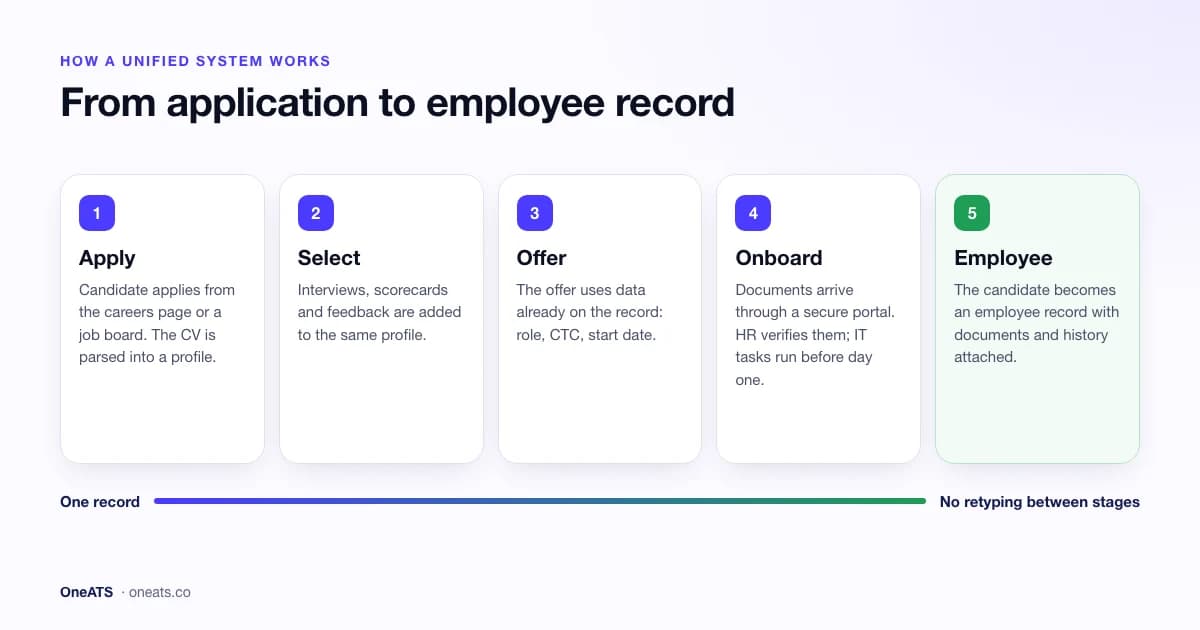
- 1Apply. The candidate applies from your careers page, Naukri, LinkedIn or Indeed. Their CV is parsed into a profile with resume parsing.
- 2Select. Interviews, interview scorecards and feedback are added to the same profile.
- 3Offer. The offer letter is generated from data already on the record (role, CTC, start date) and accepted digitally.
- 4Onboard. The new hire uploads documents through a secure portal; HR verifies them; IT and admin tasks run before day one. This is what employee onboarding software handles.
- 5Become an employee. On joining, the candidate is converted to an employee record with documents and history attached, and their details pass to payroll and the HRMS.
The test of any "unified" system is step 5. Ask a vendor to show you a candidate becoming an employee live, and check which fields carry over and which have to be typed again.
Which onboarding tools integrate with an ATS so candidate data carries over automatically once a contract is signed?
The tools that do this most reliably are applicant tracking systems with onboarding built in. In those, a signed contract or accepted offer simply moves the candidate into an onboarding stage on the same record, so there is nothing to sync. All-in-one HR suites do the same inside one database. Standalone onboarding tools can also pick up candidate data automatically, but only through a native ATS integration, an API or webhook, or an automation platform triggered when the contract is signed.
| Option | How candidate data carries over once the contract is signed | What to check |
|---|---|---|
| ATS with built-in onboarding (for example, OneATS) | Same record: accepting the offer starts onboarding with the candidate's details already filled in | Which fields appear in onboarding; whether e-signature is built in or the offer is accepted another way |
| All-in-one HR suite (recruiting module) | Hiring and HR share one database, so the new hire record is created inside the same product | How deep the recruiting module is compared with a dedicated ATS |
| Standalone onboarding tool + native ATS integration | A connector pushes the candidate to the onboarding tool when the status changes to "offer signed" or "hired" | Which event triggers the sync, which fields map across (custom fields, documents, CTC), and what happens on errors |
| ATS + onboarding tool via API, webhooks or an automation platform (such as Zapier or Make) | A rule creates the onboarding record when the contract-signed event fires | Who maintains it, field limits, failed runs, and where candidate data passes through (data protection) |
How to test it in a demo (5 minutes, and the best way to cut through sales claims):
- 1Move a test candidate to "offer accepted" or sign a test contract.
- 2Check the new-hire or onboarding record appears straight away, without anyone clicking "export".
- 3Compare every field: name, contact, role, department, manager, start date, CTC or salary, and signed documents.
- 4Change the start date in the ATS and see whether the onboarding record updates.
- 5Withdraw the offer and see whether onboarding stops and access is removed.
In OneATS, onboarding runs on the same candidate record. When the candidate accepts the offer in their candidate portal, the record moves to "Offer accepted", and document requests and IT tasks continue with the candidate's details already in place. OneATS does not include e-signature; the offer letter is generated as a PDF and accepted in the portal. See how employee onboarding software works in OneATS.
What a unified recruitment, onboarding and HR system should include
Use this as a feature checklist when you compare vendors.
Recruitment
- Multi-channel job posting (careers page, Naukri, LinkedIn, Indeed, Google for Jobs)
- Resume and CV parsing, including bulk upload
- Visual hiring pipeline with stages per job
- Interview scheduling with calendar sync, and structured scorecards
- Offer management with approval workflows
Onboarding
- Offer and appointment letters from templates, with e-signature
- A secure new-hire portal for documents (no email or WhatsApp attachments)
- Configurable document checklists per country or location
- Pre-boarding tasks for HR, IT, the hiring manager and the new hire
- Joining confirmation and conversion to an employee record
HR records
- A single employee profile with personal, job and pay details
- A document vault with access controls and an audit trail
- Job, salary and manager history
- Integration with or built-in payroll, attendance and leave
- Exit and offboarding records
Across the whole system
- Role-based access, so interviewers see feedback but not bank details
- Reporting from source of hire through to retention, with recruitment analytics
- Data retention and deletion controls
- Open API or native integrations
Benefits of one system for hiring, onboarding and HR records
- No retyping: candidate data entered once is reused for offer letters, onboarding and the employee file.
- Faster, safer onboarding: documents are collected securely and checked against a checklist, so day one is ready on time.
- Fewer joining drop-offs: scheduled touchpoints during the notice period keep accepted candidates engaged.
- A complete audit trail: who interviewed, who approved the offer and who verified each document are all on one record, which helps in audits and disputes.
- Better hiring decisions: you can see which sources and interviewers lead to employees who stay, not just to hires.
- Lower cost and effort: fewer tools, fewer logins and less integration upkeep.
How to choose a system that unifies recruitment, onboarding and HR records
Work through these eight questions before you book demos:
- 1Where is your biggest pain today? Slow hiring and messy joining point to an ATS with onboarding. Payroll and HR admin point to an HR suite.
- 2What do you already have? If your HRMS or payroll works well, keep it and choose an ATS with onboarding that integrates with it, rather than replacing everything.
- 3How many people do you hire a year? Teams hiring every month need deep recruiting tools. Teams hiring a few people a year can live with a suite's basic recruiting module.
- 4What happens at the hand-off? Ask to see a candidate become an employee in the demo. List every field that carries over: name, contact, role, CTC, start date, documents, manager.
- 5Which job boards matter to you? In India, check for direct Naukri integration; elsewhere, LinkedIn, Indeed and Google for Jobs.
- 6Does it support your compliance needs? See the next section.
- 7Who needs access, and at what cost? Hiring managers, interviewers and IT task owners should not each need a paid seat.
- 8How long is setup? Ask for a realistic go-live date and who does the data migration.
Compliance: what a unified HR system must handle in India and the UK
A unified system holds identity documents, bank details and salary data for every employee, so data protection is central.
India
- Collect and store PAN, Aadhaar, bank, education and previous-employment documents securely, with consent.
- Capture PF (UAN) and ESIC details where they apply, ready for payroll.
- Follow the Digital Personal Data Protection Act, 2023: collect only what you need, record consent, limit access and delete data when no longer required.
- See the full list in our employee onboarding checklist for Indian companies.
United Kingdom
- Complete a right-to-work check before employment starts, and keep a record of it.
- Collect a P45 or HMRC starter checklist and National Insurance number for payroll.
- Under UK GDPR, have a lawful basis for processing candidate and employee data, set retention periods (including for unsuccessful candidates), and respond to data access requests. The ICO's guidance on employment practices and data protection covers recruitment records.
A unified system makes this easier, because one retention policy and one access model cover the whole lifecycle, instead of three tools with three sets of rules.
Where OneATS fits
OneATS is an applicant tracking system with built-in onboarding: type 2 in the comparison above. It is designed for teams whose biggest challenge is getting from job post to a ready-to-work employee without retyping data or chasing documents.
- Recruitment: multi-channel posting including direct Naukri integration, resume parsing with bulk upload, visual pipelines, interview scheduling and scorecards, and recruitment analytics.
- Onboarding: offer and appointment letters from templates, a secure new-hire document portal, configurable checklists, and IT and admin tasks. Onboarding is included in the Business and Enterprise plans and is available as an add-on for Growth.
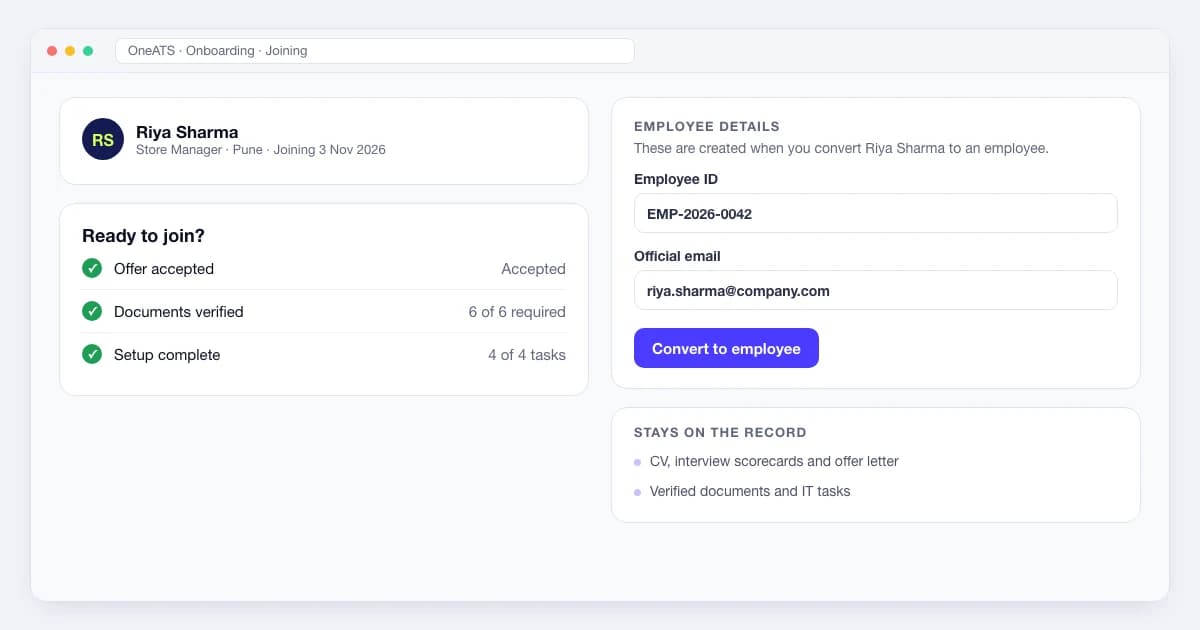
- HR records: on joining, an admin converts the candidate to an employee. OneATS assigns an Employee ID and official email, records the joining date, and keeps the verified documents, offer letter and hiring history on the record. Employee data exports as CSV or Excel for your HRMS or payroll.
If you need full payroll, attendance and leave in the same product, an all-in-one HR suite may suit you better. Many teams use OneATS for hiring and onboarding alongside the HRMS they already run for payroll. See the full list of integrations.
Frequently asked questions
Are there systems that unify recruitment, onboarding, and HR records?▼
Yes. All-in-one HR suites (HRMS or HCM platforms) cover recruitment, onboarding and HR records in one product. Applicant tracking systems with built-in onboarding, such as OneATS, cover hiring and onboarding on one record and hand a complete employee record to HR. Separate tools can also be connected through integrations.
Which onboarding tools integrate with an ATS so candidate data carries over automatically once a contract is signed?▼
The most reliable options are ATS platforms with built-in onboarding, such as OneATS, where the candidate record moves straight into onboarding once the offer or contract is accepted, and all-in-one HR suites, where hiring and HR share one database. Standalone onboarding tools can also receive candidate data automatically, but only through a native ATS integration, an API or webhook, or an automation tool triggered by the signed contract.
What is the difference between an ATS, an HRIS and an HRMS?▼
An ATS (applicant tracking system) manages hiring, from job posts to offers. An HRIS (human resources information system) stores employee records and core HR data. An HRMS (human resource management system) usually adds payroll, attendance, leave and performance on top of an HRIS. A unified system connects hiring with these HR records.
Is all-in-one HR software better than a separate ATS?▼
Not always. All-in-one HR software is convenient when payroll and HR admin are the priority, but its recruiting module is often lighter. A dedicated ATS with onboarding is usually stronger for teams that hire often, and it can connect to the HRMS you already use.
What data should carry over from recruitment to the employee record?▼
At minimum: the person's name and contact details, role, department, manager, start date, agreed salary or CTC, signed offer letter, verified documents (ID, tax, right to work), and the interview and approval history.
Can a small business use one system for hiring and onboarding?▼
Yes. Small and growing businesses often get the most benefit, because a few people handle hiring, onboarding and HR together. Look for setup in days, free seats for hiring managers, and plans that include onboarding.
How does a unified HR system help with GDPR and the DPDP Act?▼
It keeps candidate and employee data in one secure place, with one set of access controls and retention rules. It also replaces email and WhatsApp attachments, which makes it easier to show consent, limit access and delete data on time.
Conclusion: choose the system that fixes your biggest hand-off
So, are there systems that unify recruitment, onboarding, and HR records? Yes. They exist in three forms: all-in-one HR suites, ATS platforms with built-in onboarding, and connected best-of-breed tools. The right choice depends less on the feature list than on where your process breaks today. For most growing teams, that break is the stretch from accepted offer to employee record.
If hiring speed and smooth joining matter most, start with an ATS that includes onboarding and connects to your HR and payroll tools. See OneATS onboarding or start a free trial.
Editorial Integrity & Sourcing: All articles are authored and verified by our recruitment operations and engineering team, vetted against primary regulatory documentation (such as India's DPDP Act, 2023 and EPFO/ESIC guidelines) and direct job portal APIs before publication.

Pankaj Mukadam is the Head of Product at OneATS. With deep expertise in talent acquisition infrastructure and recruitment operations, he leads product architecture and hiring workflows at OneATS, helping companies streamline recruitment across India and globally.